ntfy - Server Alerts
ntfy - Server Alerts
Table of Contents
- Overview
- Stack
- Architecture
- Deployment Summary
- Alert Channels
- Monitoring Scripts
- CrowdSec Integration
- Certificate Management
- Alert Reference
- Known Issues and Lessons Learned
- References
Lightweight push notification layer deployed on vps-web, bound exclusively to the Tailscale network interface with a Tailscale-issued TLS certificate. No public exposure, no reverse proxy, no Firebase dependency.
Practical use cases: CrowdSec ban alerts, disk threshold warnings, service outages, Postfix relay failures, Fail2ban bans, SSH login detection, and sudo activity tracking. All notifications delivered to Android via the ntfy F-Droid app over Tailscale.
Stack
- ntfy 2.22.0 (binwiederhier/ntfy) — Debian package, systemd service
- Tailscale cert — Let’s Encrypt certificate issued via Tailscale HTTPS feature
- SQLite — persistent message cache (
/var/cache/ntfy/cache.db) - Android — ntfy F-Droid build, polling over Tailscale
Architecture
[Android / Browser on Tailnet]
        |
   Tailscale mesh (WireGuard, encrypted)
        |
   vps-web Tailscale interface (ip:port)
        |
   ntfy — HTTPS only, bound to Tailscale IP
        |
   Three topics: alerts | crowdsec | activity
ntfy binds only to the Tailscale-assigned IP. It is not reachable on the public interface. The Tailscale hostname resolves via MagicDNS to the Tailscale IP. TLS is handled by a certificate issued for the hostname — IP connections fail cert validation by design.
Deployment Summary
| Component | Status | Notes |
|---|---|---|
| ntfy install | Done | Debian package via archive.ntfy.sh |
| Tailscale cert | Done | Expires 2026-07-25, auto-renewal cron active |
| server.yml | Done | HTTPS only, public HTTP blocked |
| ntfy-alert.sh helper | Done | /usr/local/bin/ntfy-alert.sh |
| vps-monitor.sh | Done | Cron every 5 min, /etc/cron.d/vps-monitor |
| vps-activity.sh | Done | Cron every 1 min, /etc/cron.d/vps-activity |
| CrowdSec HTTP plugin | Done | Real-time ban notifications |
| Android app | Done | F-Droid build, all three topics subscribed |
| Cert auto-renewal | Done | /etc/cron.d/ntfy-cert-renew, 1st of month 03:00 |
Alert Channels
Three ntfy topics are in use, each covering a distinct category:
| Topic | Purpose | Managed by |
|---|---|---|
| alerts | Disk, services, Postfix, Fail2ban | vps-monitor.sh (cron 5 min) |
| crowdsec | CrowdSec ban decisions | CrowdSec HTTP notification plugin (real-time) |
| activity | SSH logins, brute force, sudo | vps-activity.sh (cron 1 min) |
Monitoring Scripts
vps-monitor.sh
Polls disk usage, systemd service state, Postfix relay errors, and Fail2ban bans every five minutes. State files in /var/lib/vps-monitor/ prevent repeat alerts for persistent conditions — a single alert fires when a condition is first detected and clears automatically when resolved.
Services monitored: ntfy, postfix, crowdsec, fail2ban
Disk threshold: 80% — adjust DISK_THRESHOLD in the script.
Install:
echo "*/5 * * * * root /usr/local/bin/vps-monitor.sh" \
  | sudo tee /etc/cron.d/vps-monitor
sudo chmod 644 /etc/cron.d/vps-monitor
Test disk alert by temporarily lowering threshold:
sudo sed -i 's/DISK_THRESHOLD=80/DISK_THRESHOLD=1/' /usr/local/bin/vps-monitor.sh
sudo /usr/local/bin/vps-monitor.sh
sudo sed -i 's/DISK_THRESHOLD=1/DISK_THRESHOLD=80/' /usr/local/bin/vps-monitor.sh
sudo su -
rm -f /var/lib/vps-monitor/disk_alert
exit
vps-activity.sh
Watches journald for SSH logins, SSH brute force attempts, and sudo usage. Runs every minute via cron. State files in /var/lib/vps-activity/ deduplicate events using an md5 hash of the journal line, auto-cleaned after 10 minutes.
SSH brute force threshold: 5 failures in 2 minutes — adjust SSH_FAIL_THRESHOLD in the script.
Install:
echo "* * * * * root /usr/local/bin/vps-activity.sh" \
  | sudo tee /etc/cron.d/vps-activity
sudo chmod 644 /etc/cron.d/vps-activity
Test sudo detection:
sudo ls /tmp && sudo /usr/local/bin/vps-activity.sh
Test SSH login detection: open a second SSH session, then run the script in the first session.
Test brute force threshold:
sudo sed -i 's/SSH_FAIL_THRESHOLD=5/SSH_FAIL_THRESHOLD=1/' /usr/local/bin/vps-activity.sh
sudo /usr/local/bin/vps-activity.sh
sudo sed -i 's/SSH_FAIL_THRESHOLD=1/SSH_FAIL_THRESHOLD=5/' /usr/local/bin/vps-activity.sh
sudo su -
rm -f /var/lib/vps-activity/ssh_fail_alert
exit
ntfy-alert.sh Helper
Reusable curl wrapper used by both monitoring scripts and callable directly from any script on the VPS. Validates Tailscale is running before attempting delivery.
Usage:
# Standalone
ntfy-alert.sh "Title" "Message" "priority"

# Sourced into another script
source /usr/local/bin/ntfy-alert.sh
ntfy_send "Title" "Message" "high"
Priority values: min low default high urgent
CrowdSec Integration
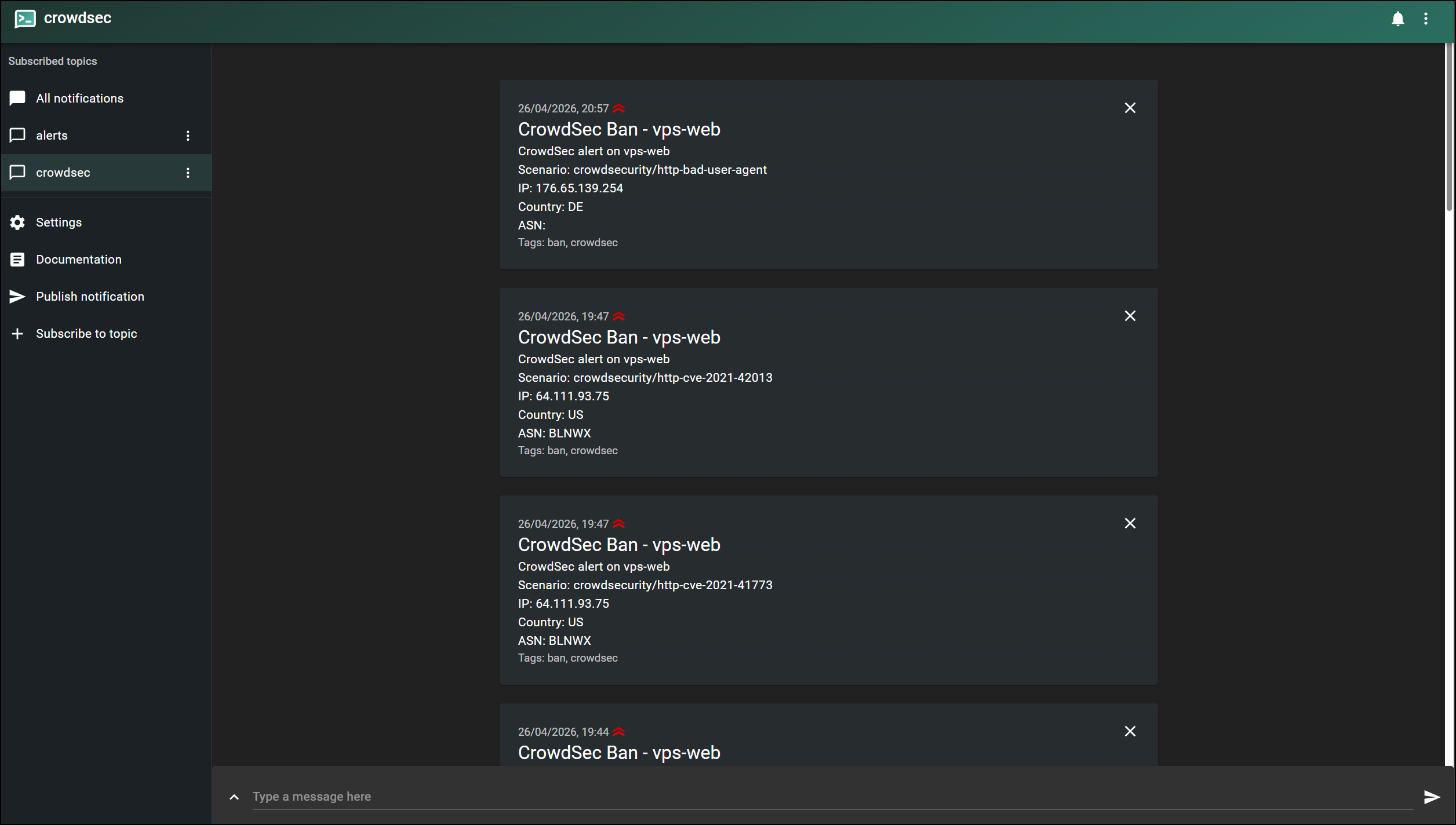
CrowdSec fires notifications in real time on every IP ban decision via its native HTTP notification plugin. No polling — the event triggers the notification immediately.
Config: /etc/crowdsec/notifications/http.yaml
Topic: crowdsec
Format template — only .Scenario is available in the cscli notifications test mock object. Full fields including .Source.IP, .Source.Cn, and .Source.AsName are available on real ban decisions:
format: |
  {{range . -}}
  CrowdSec alert on vps-web
  Scenario: {{.Scenario}}
  IP: {{.Source.IP}}
  Country: {{.Source.Cn}}
  ASN: {{.Source.AsName}}
  {{end -}}
Test notification pipeline:
sudo cscli notifications test ntfy_alerts
Verify delivery:
curl https://PLACEHOLDER:2586/crowdsec/json?since=10m
Certificate Management
Certificate issued via tailscale cert for the Tailscale hostname. Valid 90 days, renewed monthly by cron.
Issue manually:
sudo tailscale cert \
  --cert-file /etc/ntfy/certs/PLACEHOLDER.crt \
  --key-file  /etc/ntfy/certs/PLACEHOLDER.key \
  PLACEHOLDER
Check expiry:
openssl x509 -in /etc/ntfy/certs/PLACEHOLDER.crt \
  -noout -subject -dates
Auto-renewal cron: /etc/cron.d/ntfy-cert-renew — runs 1st of each month at 03:00. Compares cert fingerprint before and after renewal and only restarts ntfy if the cert changed.
Test renewal script:
sudo /usr/local/bin/ntfy-cert-renew.sh
sudo journalctl -t ntfy-cert-renew --no-pager
Expected: Certificate unchanged - no restart needed
Alert Reference
| Alert | Topic | Priority | Trigger | Repeat Suppressed |
|---|---|---|---|---|
| Disk >80% | alerts | high | df / above threshold | Yes |
| Service down | alerts | urgent | systemctl is-active fails | Yes |
| Postfix relay error | alerts | high | SASL/connection errors in journal | Yes |
| Fail2ban ban | alerts | default | Ban entry in fail2ban journal | No |
| CrowdSec ban | crowdsec | high | Real-time ban decision | No |
| SSH login | activity | default | Accepted auth in ssh journal | Yes (10 min) |
| SSH brute force | activity | high | 5+ failures in 2 min | Yes |
| Sudo command | activity | default | COMMAND= via _COMM=sudo filter | Yes (10 min) |
Known Issues and Lessons Learned
Chat Interface Markdown Auto-Linking of Hostnames
The Windows Terminal interface auto-converts .ts.net hostnames into markdown hyperlinks when pasted into terminal commands. Files written via heredoc pick up the literal bracket and parenthesis characters, breaking the hostname value.
Detection:
grep -c '\[' /path/to/script.sh
Returns 0 if clean. Resolution: write scripts with PLACEHOLDER in the heredoc and replace the value manually in nano.
ntfy Default Public HTTP Listener
When listen-https is configured without explicitly setting listen-http, ntfy opens a default listener on :80 bound to all interfaces including the public IP. Always include listen-http: "-" in server.yml when using HTTPS.
tailscale cert Glob chmod Failure
After tailscale cert, glob chmod commands (chmod *.key) may fail with “No such file or directory”. The cert and key are already correctly permissioned by tailscale cert itself. Verify with ls -la and use literal filenames if correction is needed.
CrowdSec HTTP Plugin Strict TLS Validation
The CrowdSec HTTP plugin performs strict x509 TLS validation. Connecting via IP (100.75.228.108) fails because the cert has no IP Subject Alternative Names. Always use the Tailscale hostname in the notification URL.
CrowdSec Format Template Field Availability
The cscli notifications test command sends a minimal mock object. Fields like .Value, .Type, .Duration, and .Source.IP are unavailable in the test context and cause template errors. Only .Scenario is safe to use for test validation. Real ban decisions expose the full field set.
journalctl _COMM=sudo Required for sudo Detection
Generic journalctl queries do not reliably surface sudo events on this system. The _COMM=sudo journald field filter is required:
journalctl _COMM=sudo --since "2 minutes ago" --no-pager -q
1 Minute Journal Window Too Tight
Initial --since "1 minutes ago" windows missed events that occurred just before the script ran. Extended to --since "2 minutes ago" across all journal queries to ensure overlap between cron runs.
ntfy Topic Names are Case Sensitive
activity, alerts, and crowdsec must be subscribed exactly as lowercase. Activity or Crowdsec will not receive messages.
rm -f Requires Root for State File Cleanup
The debian user does not have sudo rights for rm on /var/lib/vps-monitor/ or /var/lib/vps-activity/. Manual state file cleanup must be done as root:
sudo su -
rm -f /var/lib/vps-monitor/*
rm -f /var/lib/vps-activity/*
exit
References
- ntfy Documentation: https://docs.ntfy.sh/
- ntfy Installation: https://docs.ntfy.sh/install/
- ntfy Server Configuration: https://docs.ntfy.sh/config/
- ntfy Publish API: https://docs.ntfy.sh/publish/
- Tailscale HTTPS Certificates: https://tailscale.com/kb/1153/enabling-https/
- CrowdSec HTTP Notification Plugin: https://docs.crowdsec.net/docs/notification_plugins/http/
- CrowdSec Profiles Configuration: https://docs.crowdsec.net/docs/concepts/profiles/
- journald fields reference: https://www.freedesktop.org/software/systemd/man/systemd.journal-fields.html
- ntfy Android App (F-Droid): https://f-droid.org/en/packages/io.heckel.ntfy/
- Let’s Encrypt Certificate Validity: https://letsencrypt.org/docs/faq/