NAT Is Not Security
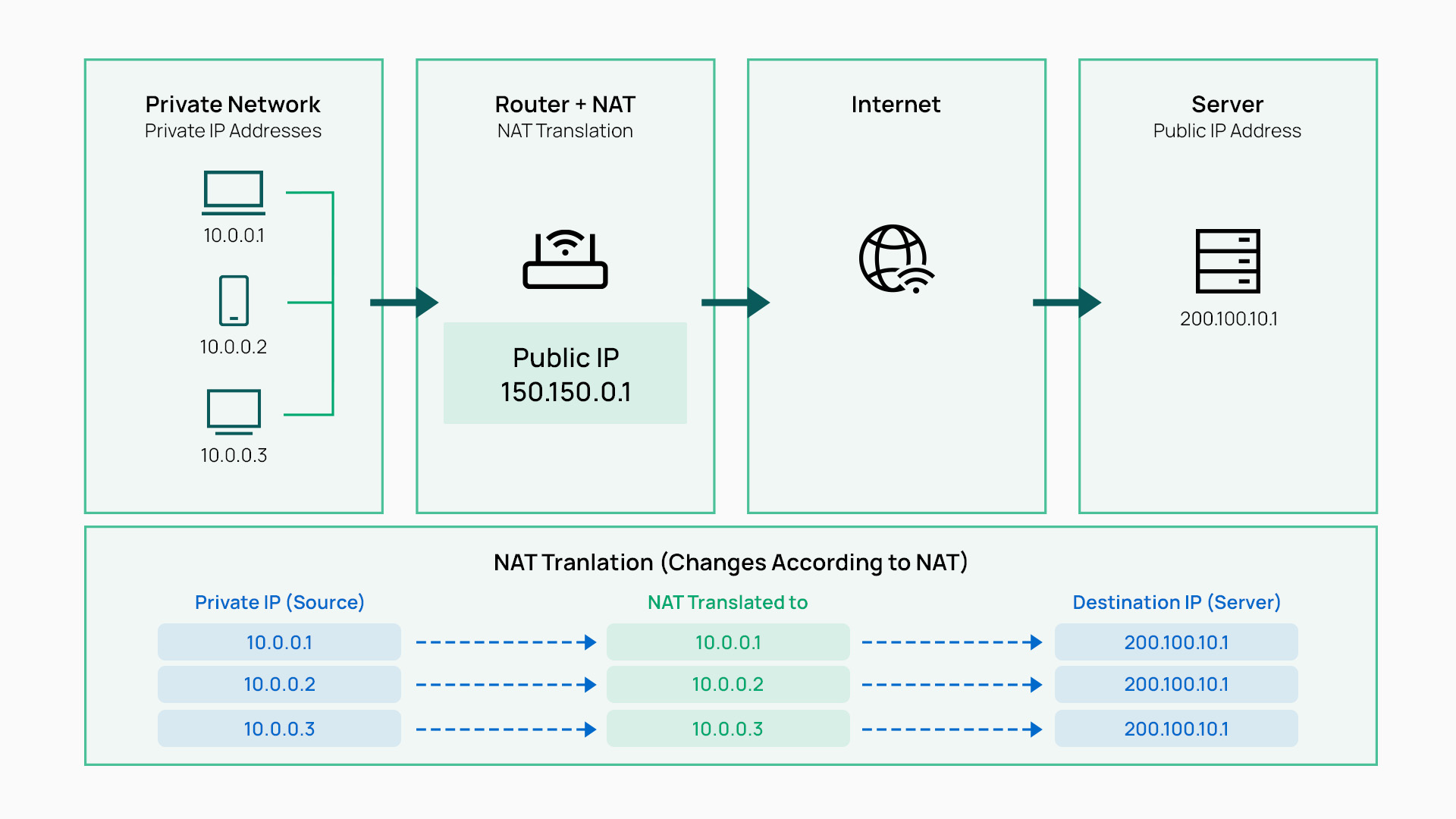
At the end of a Friday a few weeks ago, a friend mentioned a project they were working on and described it as secure because “the network is behind NAT.” It’s a common thing to hear, and it made me ask why people assume it, and whether it is true at all. My understanding from university was that Network Address Translation is a clever way to stretch IPv4. IPv4 has about 4.3 billion addresses in total, and that pool ran short long ago. Private address space, the ranges defined in RFC 1918 (10.0.0.0/8, 172.16.0.0/12 and 192.168.0.0/16), is much smaller at roughly 17.9 million addresses. But it can be reused in every network, because it is never routed on the public internet. NAT is what lets all those privately addressed networks share a small number of public addresses. That definition still holds. NAT was designed to conserve public address space, and whatever security benefit it carries comes from how the technology works, not from any intent to protect.
Consider a device on my home network with the address 192.168.1.10. Thousands of other networks use exactly the same address, so it cannot identify my device on the internet, and ISPs will not route it anyway. For that device to talk to a remote server, something has to stand in for it. That is the router’s job. When the device sends a packet out, the router overwrites the source address and port with its own public WAN address and a port it chooses. It fixes the checksums and sends the packet on. It also writes an entry in its state table recording the mapping, for example that public port 40001 belongs to 192.168.1.10 on port 51000.
It is easy to picture this as the router wrapping the device’s identity inside the packet, and I originally thought of it that way. That is not what happens. NAT is translation, not encapsulation. The internal address is replaced, not carried along, and it exists only in the router’s state table. The MAC address never leaves the local network at all, whether or not NAT is in use. Every router strips the Ethernet header when a frame arrives and builds a new one for the next hop. Real encapsulation, where a whole packet is wrapped inside another, is what tunnels do. IPsec NAT traversal, which wraps ESP inside UDP port 4500 so it can pass through NAT, is an example.
Because many internal devices share one public address, with ports telling them apart, NAT in the home or office is a many-to-one arrangement. When a reply comes back to the public address and port, the router looks up the state table, finds the matching entry, rewrites the destination back to the internal device, and forwards it. From outside, only the router’s public address is visible. An internal device can be reached through that address only if it started the conversation, or if someone deliberately configured a port forward or a UPnP mapping to it.
This is where the assumption of security comes from. If an unsolicited packet arrives at the public address, there is no matching entry in the state table and no internal device to send it to. The internal devices seem to be hidden and unreachable. It is also tempting to think that an attacker could inspect packets to work out which device sent them and then reach it. In fact the translated packet contains neither the internal address nor the MAC address, so there is nothing to recover. Some indirect leakage exists: fingerprinting can estimate how many hosts sit behind a NAT, and some applications put private addresses inside their payloads. But knowing an internal address is not what makes a device reachable. Reachability depends on routing and policy, not on what an attacker knows.
The question I had never asked was what happens if a packet is simply addressed to a private IP. Across the internet it will not arrive, because ISPs do not route private ranges. That protection comes from other people’s routing policy, not from my NAT. However, anything that can reach my router’s WAN interface directly, such as a host on the same ISP segment or a compromised upstream device, can add a route to my internal range via my WAN address and send packets to 192.168.1.10. My firewall is a router. It will look up its routing table, see that network directly connected, and forward the packet. NAT does nothing to stop this, because a packet that needs no translation passes through the translation rules untouched. What actually drops it is the firewall’s stateful default-deny policy. That is the real reason unsolicited inbound traffic fails.
This is also why “block private networks” and “block bogon networks” are still needed on a WAN interface, although for a slightly different reason than I first thought. Those rules match the source address of incoming packets, not the destination. A packet arriving from the internet with a private or unallocated source address can never be legitimate, so it must be spoofed. Blocking it stops attackers from impersonating “internal” addresses that other rules or services might trust. It also cuts out a large amount of spoofed scanning and attack traffic. NAT performs no such check. The two rule types together cover the two gaps NAT leaves: the default-deny rule handles packets aimed at internal destinations, and the anti-spoofing rules handle forged sources.
Application layer gateways show the same weakness from another angle. Some protocols, such as SIP and active FTP, carry IP addresses and ports inside their payloads, which NAT breaks. An ALG reads the payload, rewrites those addresses, and opens a hole in the firewall for the connection the payload announces. That means the content of a packet, which an internal device or even a web page running in a browser can shape, decides which ports the firewall opens. The 2020 NAT Slipstreaming attack used exactly this to open inbound access to internal machines from a malicious website.
IPv6 makes the whole question plain. IPv6 has no need for NAT, and every device with a global address is routable from anywhere by design. What protects those devices is the same thing that was protecting my IPv4 network all along: a stateful firewall that allows replies to connections started from inside and denies everything else. With the growing number of IoT devices receiving global IPv6 addresses automatically, many of them poorly maintained, that firewall policy is the only thing between them and the internet.
So is “behind NAT, so it is secure” true? Not in any meaningful sense. NAT happens to create conditions in which unsolicited traffic has nowhere to go. But the security comes from state and policy, not translation: a default-deny firewall, anti-spoofing rules, careful control of port forwards, UPnP and ALGs, and segmentation inside the network. My friend’s project may well be secure, but if it is, NAT is not the reason.
This article explains why the security commonly attributed to NAT is incidental rather than designed. It covers why anti-spoofing controls (blocking RFC1918 and bogon sources) are still required at a NAT edge, and why ALGs weaken the edge by letting packet payloads control firewall pinholes. The examples use pfSense (FreeBSD pf), but the principles apply to any NAT device.
Summary
| Assumption | Reality |
|---|---|
| Inside addresses are hidden, so inside hosts are safe | Hiding an address does not stop a router from forwarding a packet addressed to it. Only filter policy stops that. |
| NAT drops unsolicited inbound traffic | The drop comes from the state table plus a default-deny rule, not from translation. |
| NAT stops spoofed traffic | NAT does not validate source addresses. Private and bogon sources must be blocked explicitly. |
| NAT only touches headers | ALGs parse payloads and open ports based on their content, so inside-controlled data can create inbound holes. |
RFC 4864 states that the protection people perceive in IPv4 NAT can be provided in IPv6 by stateful filtering alone, without address translation.
What NAT Actually Does
NAT (RFC 3022) rewrites addresses, and NAPT also rewrites ports, so that many inside hosts can share one public address. It was designed to conserve addresses, not to provide security.
For each outbound flow the device records a mapping:

203.0.113.5:40001 (192.168.1.10:51000) -> 198.51.100.7:443
A reply that matches the mapping is translated back and forwarded. A packet that matches no mapping has no translation to apply. What happens to that packet next depends on the filter policy, not on NAT.
Packet Flow Through NAT
This section follows one outbound flow from the inside host’s Ethernet frame to the translated frame on the WAN, then the return path. It shows at which point each header is stripped, rewritten or rebuilt, and where the drop of unsolicited inbound traffic actually happens.
Scenario
Inside host   : 192.168.1.10   MAC aa:aa:aa:00:00:10
Router LAN    : 192.168.1.1    MAC bb:bb:bb:00:00:01   (pfSense LAN)
Router WAN    : 203.0.113.5    MAC cc:cc:cc:00:00:05   (pfSense WAN)
ISP gateway   : 203.0.113.1    MAC dd:dd:dd:00:00:01
Remote server : 198.51.100.7   TCP 443

Flow: 192.168.1.10:51000  ->  198.51.100.7:443
Overview
[Host] --frame 1--> [Switch] --frame 1--> [Router LAN NIC]
                                                |
                                   de-encapsulate L2 (strip Ethernet)
                                                |
                                   IP checks, TTL decrement, route lookup
                                                |
                                   pf: state lookup / filter / NAT
                                                |
                                   rewrite src IP + src port, fix checksums
                                                |
                                   re-encapsulate L2 (new Ethernet header)
                                                |
[ISP gateway] <--frame 2-- [Router WAN NIC] <---+
Stage 1: Host Builds the Frame
The destination is off-subnet, so the host sends the frame to its default gateway. It resolves the gateway MAC via ARP. The IP destination stays the remote server.
+--------------------------------------------------------------------+
| ETHERNET HEADER                                                    |
|   Dst MAC   : bb:bb:bb:00:00:01   (router LAN, via ARP)            |
|   Src MAC   : aa:aa:aa:00:00:10   (host)                           |
|   EtherType : 0x0800 (IPv4)                                        |
+--------------------------------------------------------------------+
| IPv4 HEADER                                                        |
|   Src IP    : 192.168.1.10                                         |
|   Dst IP    : 198.51.100.7                                         |
|   TTL       : 64                                                   |
|   Protocol  : 6 (TCP)                                              |
|   Hdr cksum : X1                                                   |
+--------------------------------------------------------------------+
| TCP HEADER                                                         |
|   Src port  : 51000                                                |
|   Dst port  : 443                                                  |
|   Checksum  : Y1  (covers pseudo-header incl. src/dst IP)          |
+--------------------------------------------------------------------+
| PAYLOAD (e.g. TLS ClientHello)                                     |
+--------------------------------------------------------------------+
| FCS (Ethernet CRC-32)                                              |
+--------------------------------------------------------------------+
Stage 2: Switch Forwards (Layer 2 Only)
Switch looks up Dst MAC bb:bb:bb:00:00:01 in its MAC table
and forwards out the port toward the router.
No change to any header.
Stage 3: Router Receives on LAN and De-encapsulates
1. NIC checks FCS and that Dst MAC matches its own (or broadcast/multicast).
2. Ethernet header and FCS are stripped.  --> The frame is discarded here;
                                              only the IP packet continues.
3. IP header validated (version, length, header checksum).
4. TTL decremented 64 -> 63 (a TTL of 0 would mean discard + ICMP Time Exceeded).
5. Routing table lookup for 198.51.100.7 -> default route via WAN,
   next hop 203.0.113.1.
Stage 4: pf Processing (pfSense)
Inbound on LAN
--------------
  state table lookup
    |-- match found  --> skip rules, apply stored translation (existing flow)
    |-- no match     --> evaluate LAN filter rules
                          |-- block --> drop
                          |-- pass  --> create state, continue

Outbound on WAN
---------------
  translation (outbound NAT) rules evaluated
    |-- matching rule --> src 192.168.1.10:51000 becomes 203.0.113.5:40001
  WAN outbound filter rules see the TRANSLATED source
  state entry records both sides of the mapping:

    203.0.113.5:40001 (192.168.1.10:51000) -> 198.51.100.7:443

  This state entry is the "NAT table" (pfctl -s state).
Stage 5: Header Rewrite
Field           Before              After              Why
--------------  ------------------  -----------------  ----------------------
Src IP          192.168.1.10        203.0.113.5        NAT (address)
Src port        51000               40001              NAPT/PAT (port)
TTL             64                  63                 Routing (stage 3)
IP hdr cksum    X1                  X2                 IP header changed
TCP cksum       Y1                  Y2                 Pseudo-header IP and
                                                       port changed
Dst IP / port   unchanged           unchanged
Payload         unchanged           unchanged          (unless an ALG
                                                       rewrites it, e.g. SIP)
Checksums are normally updated incrementally rather than fully recomputed (RFC 1624). The payload row is where ALGs enter the picture; see ALG: Binding Ports to Payloads.
Stage 6: Re-encapsulate on WAN
The router resolves the next-hop MAC (the ISP gateway) via ARP and builds a brand new Ethernet header.
+--------------------------------------------------------------------+
| ETHERNET HEADER (NEW)                                              |
|   Dst MAC   : dd:dd:dd:00:00:01   (ISP gateway, via ARP)           |
|   Src MAC   : cc:cc:cc:00:00:05   (router WAN)                     |
|   EtherType : 0x0800 (IPv4)                                        |
+--------------------------------------------------------------------+
| IPv4 HEADER (TRANSLATED)                                           |
|   Src IP    : 203.0.113.5         <-- changed                      |
|   Dst IP    : 198.51.100.7                                         |
|   TTL       : 63                  <-- changed                      |
|   Hdr cksum : X2                  <-- changed                      |
+--------------------------------------------------------------------+
| TCP HEADER (TRANSLATED)                                            |
|   Src port  : 40001               <-- changed                      |
|   Dst port  : 443                                                  |
|   Checksum  : Y2                  <-- changed                      |
+--------------------------------------------------------------------+
| PAYLOAD (unchanged)                                                |
+--------------------------------------------------------------------+
| FCS (NEW CRC-32)                                                   |
+--------------------------------------------------------------------+
If the WAN uses PPPoE, a PPPoE (6 bytes) plus PPP (2 bytes) header sits between the Ethernet header and IP. The EtherType becomes 0x8864 and the effective MTU drops to 1492 (RFC 2516).
Stage 7: Return Path (Reverse Translation)
Server reply arrives on WAN:
   198.51.100.7:443 -> 203.0.113.5:40001

[WAN NIC] strip Ethernet --> IP checks --> pf state lookup
                                             |
            match: 203.0.113.5:40001 <-> 192.168.1.10:51000
                                             |
            rewrite DST 203.0.113.5:40001 -> 192.168.1.10:51000
            fix checksums, TTL decrement
                                             |
            route lookup -> LAN, ARP for 192.168.1.10
                                             |
[LAN NIC] new Ethernet header:
            Dst MAC aa:aa:aa:00:00:10  Src MAC bb:bb:bb:00:00:01
                                             |
                                          [Host]

Unsolicited inbound packet (no state match, no port forward):
   no mapping --> dropped by the WAN default-deny rule.
   This is the side-effect "protection" of NAT. It comes from state
   plus policy, not from the translation itself.
Variant: NAT-T (IPsec ESP Encapsulated in UDP 4500)
ESP has no ports, so NAPT cannot multiplex it. When NAT is detected during IKE, ESP is wrapped in UDP.
Without NAT-T (breaks behind NAPT):
+----------+---------+-----------+--------------------------+---------+
| Ethernet | IP (50) | ESP hdr   | encrypted inner packet   | ESP trl |
+----------+---------+-----------+--------------------------+---------+

With NAT-T (RFC 3948):
+----------+---------+-----------------+---------+-------------+-------+
| Ethernet | IP (17) | UDP 4500 -> 4500| ESP hdr | encrypted   | ESP   |
|          |         | (NAT rewrites   |         | inner packet| trl   |
|          |         |  outer IP/port) |         |             |       |
+----------+---------+-----------------+---------+-------------+-------+
NAT rewrites only the outer IP and UDP headers. The ESP payload is untouched, so integrity holds. IKE also moves from UDP 500 to 4500. AH cannot be fixed this way because its integrity check covers the outer IP header, which NAT changes.
Comparison: IPv6 (No NAT, Stateful Filter)
Stage 3  : same, except Hop Limit is decremented instead of TTL
           (IPv6 has no header checksum).
Stage 4  : state created by the LAN pass rule; no translation rule.
Stage 5  : only Hop Limit changes. Src IP and port are untouched, so the
           transport checksum is unchanged.
Stage 6  : new Ethernet header (EtherType 0x86DD). The next-hop MAC is
           resolved via NDP (NS/NA) instead of ARP.
Stage 7  : reply matches state and is forwarded; unsolicited inbound is
           dropped by the same default-deny rule.
The IPv6 flow reaches the same security outcome at stages 4 and 7 with no translation at all.
The Obfuscation Assumption
Hidden Is Not Unreachable
The belief is that remote hosts cannot see or address inside hosts, so inside hosts cannot be attacked. That is partly true for hosts across the internet, but for the wrong reason:
- RFC1918 addresses are not routed on the public internet. ISPs and backbone routers drop or never carry them, so a remote attacker cannot get a packet addressed to
192.168.1.10across the internet to your WAN. - That protection comes from other networks’ routing policy, not from your NAT device.
Routing Still Delivers Packets to Inside Addresses
Any host that can reach your WAN interface at layer 2 does not depend on internet routing. Examples include a host on the same ISP segment, a shared DOCSIS or PON segment, an upstream router you don’t control, a compromised CPE, or a datacentre neighbour. That host can simply point a route at your WAN address:
# Attacker on the WAN segment (illustrative)
ip route add 192.168.1.0/24 via 203.0.113.5
nmap -sS 192.168.1.0/24
Your firewall is a router. It receives a packet with destination 192.168.1.10, looks up its routing table, finds 192.168.1.0/24 directly connected on the LAN, and forwards it. Nothing about NAT prevents this. NAT rules only match flows they are asked to translate; this packet needs no translation to be deliverable.
Logical deduction, consistent with how IP forwarding works (RFC 1812): a Linux router doing MASQUERADE with a permissive FORWARD policy forwards these packets. A pfSense box does not, but only because its default WAN ruleset blocks unsolicited inbound traffic.
Where the Drop Actually Happens
On pfSense the sequence for an unsolicited inbound packet is:
WAN NIC -> strip Ethernet -> pf state lookup (no match)
        -> translation rules (no rdr/binat match, packet unchanged)
        -> filter rules: block private sources / block bogons / default deny
        -> DROP
Remove the default-deny WAN rule and NAT would still be “working”, yet inside hosts would be reachable from the WAN segment. The security was always the filter.
Why Block RFC1918 and Bogons Is Still Needed
What the Rules Actually Match
pfSense exposes two options on the WAN interface (Interfaces > WAN > Reserved Networks):
| Option | Matches | Purpose |
|---|---|---|
| Block private networks and loopback addresses | Inbound packets whose source is RFC1918, loopback, or IPv6 ULA | Anti-spoofing |
| Block bogon networks | Inbound packets whose source is reserved or not allocated by IANA | Anti-spoofing |
Both rules are source-address checks. They do not by themselves stop a packet destined to your inside range; the default-deny rule does that. The two controls address two different failures of the NAT-as-security assumption:
| Failure | Attack | Control |
|---|---|---|
| NAT does not stop forwarding to inside destinations | On-link host routes to your LAN via your WAN | Stateful default-deny inbound |
| NAT does not validate sources | Spoofed private or bogon sources, reflection, evading rules that trust “internal” ranges | Block private and bogon sources on WAN |
Why spoofed private sources matter:
- A rule, service, or ACL that trusts
192.168.0.0/16or10.0.0.0/8as “internal” can be satisfied by a spoofed packet arriving on the WAN. Examples include management access rules, application allow-lists, and syslog or SNMP receivers. - A packet with a private source arriving on the WAN can never be legitimate internet traffic, because those ranges are not routed publicly. Blocking it removes a whole class of spoofing with no false positives, except in the double-NAT case below.
- Spoofed bogon sources are common in DoS and scanning traffic, because the attacker never needs the replies.
RFC1918 and Special-Purpose Ranges
| Range | Defined In | Purpose |
|---|---|---|
| 10.0.0.0/8 | RFC 1918 | Private use |
| 172.16.0.0/12 | RFC 1918 | Private use |
| 192.168.0.0/16 | RFC 1918 | Private use |
| 127.0.0.0/8 | RFC 1122 | Loopback |
| 169.254.0.0/16 | RFC 3927 | Link-local |
| 100.64.0.0/10 | RFC 6598 | Shared address space (CGNAT) |
| fc00::/7 | RFC 4193 | IPv6 Unique Local Addresses |
The full list of special-purpose ranges is maintained in the IANA registries defined by RFC 6890. Which ranges each pfSense option includes depends on the version; confirm on your box with the commands in Verification on pfSense.
Bogon Networks
Bogons are address ranges that should never appear as a source on the internet. They include reserved and special-purpose ranges, plus (“fullbogons”) space that IANA or the RIRs have not yet allocated.
pfSense-specific notes:
- The bogon list is downloaded from Netgate and refreshed automatically. The update frequency is set under System > Advanced > Firewall & NAT.
- The IPv6 bogon list is large. If the table fails to load, raise Firewall Maximum Table Entries in the same menu.
- Unallocated space changes as RIRs allocate blocks. A stale list can block newly allocated, legitimate ranges, so keep updates enabled.
Egress Filtering (BCP 38)
The same logic applies outbound. BCP 38 (RFC 2827) and BCP 84 (RFC 3704) ask network edges to drop outbound packets whose source is not a legitimate internal address.
At a NAT edge this is partly handled for free, because translated traffic leaves with the WAN address. However, a packet with a source that matches no outbound NAT rule can leave untranslated if the filter permits it; this is a logical deduction from how translation rules only match what they are configured to match. Examples are a misconfigured host, a compromised device spoofing, or a VPN subnet missing from outbound NAT. A floating rule on WAN outbound that blocks private sources closes this:
Firewall > Rules > Floating
Action: Block | Interface: WAN | Direction: out
Source: RFC1918 alias (10/8, 172.16/12, 192.168/16) | Log: enabled
Outbound NAT on pfSense is applied before WAN outbound filter rules see the packet, so translated traffic, which has the WAN address as its source, is not matched by this rule.
When to Disable the Private Networks Rule
If the WAN itself sits on a private network, the rule blocks legitimate upstream traffic and must be unchecked on that interface only:
- Double NAT behind an ISP router (WAN is
192.168.x.x) - CGNAT deployments, where upstream addressing may be
100.64.0.0/10 - Lab or transit links between internal firewalls
- Site-to-site links where the “WAN” is a private MPLS or VLAN handoff
Keep bogon blocking enabled in these cases unless the upstream range is itself in the bogon list.
ALG: Binding Ports to Payloads
Why ALGs Exist
Some protocols carry IP addresses and ports inside the payload, not just in the headers:
| Protocol | Embedded Data | Result Without ALG Behind NAT |
|---|---|---|
| FTP (active) | PORT command with inside IP and port | Server connects back to a private address |
| SIP | SDP c= and m= lines with media IP and port | One-way or no audio |
| H.323, PPTP, TFTP | Negotiated secondary channels | Secondary channels fail |
NAT rewrites headers only. An ALG (RFC 2663, RFC 3027) parses the payload, rewrites the embedded addresses, and pre-creates an expectation: a pinhole allowing an inbound connection that the control channel announced.
The Trust Problem
The ALG breaks the normal security model of a NAT edge:
Normal:  inbound allowed only if it matches state created by an outbound flow
ALG:     inbound allowed if the PAYLOAD of an outbound flow says to expect it
The payload is controlled by the inside endpoint, and by anything that can influence what that endpoint sends: a browser running attacker JavaScript, malware, or a crafted document. The ALG binds firewall behaviour (open port X to host Y) to data that the firewall has no reason to trust. Also:
- The ALG has to parse complex, stateful application protocols in the forwarding path, which adds parser attack surface.
- Parsing is port-based on many implementations, so traffic that merely looks like SIP on port 5060 is treated as SIP.
Known Abuse: NAT Slipstreaming
In 2020 Samy Kamkar published NAT Slipstreaming:
- The victim visits a malicious web page.
- JavaScript causes the browser to send HTTP traffic that is shaped so that part of it lands at a packet boundary looking like a SIP REGISTER or an H.323 message.
- The router’s ALG parses it as SIP or H.323 and opens an inbound pinhole to the victim’s internal address and a port the attacker chose.
- The attacker connects inbound to any TCP or UDP service on the internal host.
A second version extended this to reach other internal hosts, not only the victim’s machine. Browser vendors responded by blocking the relevant ports, but the root cause is the ALG design.
SIP ALG Breakage
Even without an attacker, SIP ALGs on many routers corrupt SIP signalling. They rewrite headers incorrectly, mangle SDP, or break TLS-protected SIP that they cannot read. Standard VoIP provider guidance is to disable the SIP ALG and let the phone system handle NAT traversal (STUN, ICE, TURN, or an SBC). On pfSense, Netgate’s VoIP guidance centres on static-port outbound NAT rather than payload rewriting.
Linux Conntrack Helper Change
Linux netfilter used to attach helpers (Linux’s ALG equivalent) automatically to any traffic on well-known ports. Starting with kernel 4.7, automatic helper assignment is disabled by default (nf_conntrack_helper=0), and helpers must be assigned explicitly to specific flows. The Netfilter project documented why: helpers applied broadly let attackers craft traffic that opens expectations.
ALG Recommendations
- Disable SIP and H.323 ALGs on edge devices unless a specific, supported need exists.
- Prefer protocols that don’t embed addresses: passive FTP or SFTP instead of active FTP, SIP over TLS with ICE/STUN or an SBC.
- Where a helper is required, assign it explicitly to specific hosts and ports rather than globally.
- Treat any ALG as part of the attack surface in firewall reviews.
What Actually Provides the Security
| Control | What It Stops |
|---|---|
| Stateful default-deny inbound | Unsolicited inbound, including routed-to-inside packets |
| Block private and bogon sources (ingress) | Spoofed sources, trust-by-range bypass |
| Egress filtering (BCP 38 and outbound policy) | Spoofed or untranslated leakage, C2 and exfiltration on unexpected ports |
| No or explicitly scoped ALGs | Payload-driven pinholes |
| Disable UPnP, NAT-PMP, PCP (or restrict them) | Inside hosts opening inbound holes on their own |
| Internal segmentation (VLANs plus inter-VLAN rules) | Lateral movement, which NAT never addressed |
| Switch-level L2 protections (DHCP snooping, DAI, RA Guard) | On-link spoofing, which NAT never addressed |
NAT appears nowhere in the “What It Stops” column. It can coexist with all of these controls but contributes none of them.
IPv6 Perspective
IPv6 removes NAT for general use and makes the point explicit:
- Inside hosts have globally routable addresses, and a stateful default-deny inbound rule gives the same protection NAT was credited with (RFC 6092 recommends exactly this for CPE).
- NPTv6 (RFC 6296) is stateless prefix translation. It translates addresses but keeps no state, and it provides no inbound filtering at all. Translation without state protects nothing.
- Blocking ULA and bogon sources on the WAN still applies, for the same anti-spoofing reasons.
- ALG payload rewriting is no longer needed. Stateful firewalls still use helpers for “related” expectations, with the same trust caveats.
IPv6 Is Routable by Design
Without NAT to fall back on, the obfuscation assumption disappears completely in IPv6. Every host with a global address can be addressed from anywhere, and firewall policy is the only boundary. This matters most for IoT, where large numbers of poorly maintained devices now receive global IPv6 addresses automatically.
Address Scope
Not every IPv6 address is globally routable. The scope depends on the range (RFC 4291):
| Range | Type | Routable | IPv4 Analogue |
|---|---|---|---|
2000::/3 | Global unicast (GUA) | Yes, globally, if the prefix is advertised | Public IPv4 |
fc00::/7 (in practice fd00::/8) | Unique Local (ULA) | Within your own network only, never on the internet | RFC1918 |
fe80::/10 | Link-local | Never forwarded by routers | 169.254.0.0/16 |
ff00::/8 | Multicast | Depends on the scope field (link, site, global) | 224.0.0.0/4 |
::1/128 | Loopback | Never | 127.0.0.0/8 |
Every IPv6 interface has a link-local address. Most hosts also configure one or more GUAs through SLAAC or DHCPv6, and the GUA is what makes a host addressable from the internet.
Routable Is Not Reachable
With a GUA, whether a host can be reached depends only on whether the edge policy permits the traffic:
Internet -> ISP routes 2001:db8:10::/56 to your WAN
         -> router forwards to 2001:db8:10:1::50 (LAN)
         -> stateful default-deny: no state, no pass rule -> DROP
This is the same outcome as the IPv4 NAT case, achieved explicitly instead of as a side effect. RFC 6092 recommends stateful default-deny inbound as the default for IPv6 CPE.
What Changes Operationally
- Firewall mistakes are exposed immediately. A broad IPv6
passrule on WAN exposes real hosts directly. In IPv4, NAT with no port forward would still have had nowhere to send the traffic. IPv6 rule reviews must be as thorough as IPv4 reviews. - Host firewalls matter more. Host-level filtering (Windows Defender Firewall, nftables, pf) is a real second layer, because the edge is the only other control between the host and the internet.
- Scanning is harder but not impossible. A /64 has 2^64 addresses, so brute-force sweeps are impractical. However, addresses leak through DNS (AAAA records, zone walking), logs, email headers, and predictable patterns such as
::1,::10or EUI-64 identifiers derived from MAC addresses. RFC 7707 documents these reconnaissance techniques. Temporary addresses (RFC 8981) and stable opaque identifiers (RFC 7217) reduce predictability. - Dual-stack gaps. A common failure is a network carefully filtered for IPv4 but running IPv6 with default or no policy. pfSense’s default WAN deny covers both address families, but custom rules, upstream CPE, or other firewalls may not. Some consumer CPE also offer an option to turn the IPv6 firewall off; verify it is on.
- “We don’t use IPv6” is still an IPv6 exposure. Modern operating systems enable IPv6 by default. On a network with no IPv6 deployed, a rogue Router Advertisement can make hosts configure addresses and route IPv6 through an attacker, with no edge involvement at all (RFC 7123). Mitigate with RA Guard (RFC 6105) or an explicit IPv6 policy, not by ignoring it.
IoT and IPv6
IoT is where the loss of accidental NAT protection has the largest effect:
| Factor | Why It Matters |
|---|---|
| Automatic addressing | Devices configure GUAs through SLAAC as soon as the network advertises a prefix, with no admin action. |
| Protocol direction | Matter runs over IPv6, and Thread is an IPv6 mesh built on 6LoWPAN (RFC 4944). Smart home ecosystems are moving onto IPv6 by design. |
| Weak device security | Many devices ship with long-lived firmware, embedded network stacks, rarely patched services, and default or hard-coded credentials. NIST IR 8259 and ETSI EN 303 645 exist largely because of this baseline. |
| Identifier leakage | Devices that use EUI-64 identifiers embed the MAC address, and the vendor OUI in it can reveal the device type and manufacturer. |
| Automatic pinholes | UPnP IGD:2 includes an IPv6 firewall control service (WANIPv6FirewallControl) that lets devices request inbound pinholes. Where a gateway implements it, IPv6 inherits the same risk as IPv4 UPnP port mapping. |
| Scale | A single household or office can have dozens of IPv6-addressed devices, each an individually routable target if the edge policy is wrong. |
In IPv4, a vulnerable camera behind NAT with no port forward was unreachable from the internet by accident. In IPv6, that same camera has a globally routable address, and it is protected only if the firewall policy is correct.
Recommended IoT Controls on pfSense
- Separate IoT network. Put IoT devices on a dedicated VLAN and interface, with their own IPv6 prefix from DHCPv6-PD.
- No inbound from WAN. Keep the default deny and add no WAN pass rules targeting the IoT prefix. Device cloud services work outbound through state.
- Block IoT to internal networks. Add rules on the IoT interface blocking IoT net to LAN and management nets, for both IPv4 and IPv6.
Firewall > Rules > IOT
Action: Block | Address Family: IPv4+IPv6 | Source: IOT net | Destination: LAN net
Action: Block | Address Family: IPv4+IPv6 | Source: IOT net | Destination: This Firewall (except DNS/NTP as required)
Action: Pass  | Address Family: IPv4+IPv6 | Source: IOT net | Destination: any (or restricted to required ports)
- Disable UPnP and NAT-PMP, or restrict them with ACLs so IoT devices cannot request mappings or pinholes.
- Restrict egress where practical. Limit IoT outbound to the ports and destinations the devices need, such as DNS, NTP and HTTPS to vendor services.
- Switch-level protection. Enable RA Guard and DHCPv6 Guard on access switches so a compromised device cannot become a rogue IPv6 router.
IPv6 Exposure Checks
On pfSense, confirm IPv6 WAN policy:
pfctl -sr | grep inet6
pfctl -vvsr | grep -A3 'Default deny'
From an external host, test whether an inside GUA is actually reachable:
nmap -6 -Pn -p 22,80,443,554,1883,8080 2001:db8:10:1::50
Ports 554 (RTSP) and 1883 (MQTT) are included because they are common on cameras and IoT hubs.
On a Windows host, check address privacy settings:
netsh interface ipv6 show privacy
Get-NetIPAddress -AddressFamily IPv6 | Select-Object IPAddress, PrefixOrigin, SuffixOrigin
On a Linux host:
ip -6 addr show scope global
sysctl net.ipv6.conf.all.use_tempaddr
List IPv6 neighbours seen on the IoT interface from pfSense, to inventory which devices hold addresses:
ndp -an
Verification on pfSense
Confirm the WAN block rules are loaded:
pfctl -sr | grep -iE 'private|bogon'
Inspect the bogon tables:
pfctl -t bogons -T show | head
pfctl -t bogonsv6 -T show | wc -l
Confirm which ranges the private-networks rule covers:
grep -iE 'private|RFC 1918' /tmp/rules.debug
Confirm the default deny exists and is being hit:
pfctl -vvsr | grep -A3 'Default deny'
View live translations and confirm that only expected flows exist:
pfctl -s state | grep '('
Check UPnP / NAT-PMP status:
Services > UPnP & NAT-PMP (disabled unless required; if enabled, restrict with ACLs)
References
- RFC 1918 - Address Allocation for Private Internets: https://datatracker.ietf.org/doc/html/rfc1918
- RFC 3022 - Traditional IP Network Address Translator: https://datatracker.ietf.org/doc/html/rfc3022
- RFC 894 - Transmission of IP Datagrams over Ethernet: https://datatracker.ietf.org/doc/html/rfc894
- RFC 826 - Address Resolution Protocol (ARP): https://datatracker.ietf.org/doc/html/rfc826
- RFC 791 - Internet Protocol (IPv4): https://datatracker.ietf.org/doc/html/rfc791
- RFC 9293 - Transmission Control Protocol (checksum pseudo-header): https://datatracker.ietf.org/doc/html/rfc9293
- RFC 1624 - Computation of the Internet Checksum via Incremental Update: https://datatracker.ietf.org/doc/html/rfc1624
- RFC 3948 - UDP Encapsulation of IPsec ESP Packets: https://datatracker.ietf.org/doc/html/rfc3948
- RFC 2516 - PPP over Ethernet (PPPoE): https://datatracker.ietf.org/doc/html/rfc2516
- RFC 8200 - IPv6 Specification: https://datatracker.ietf.org/doc/html/rfc8200
- RFC 4861 - Neighbor Discovery for IPv6: https://datatracker.ietf.org/doc/html/rfc4861
- RFC 1812 - Requirements for IP Version 4 Routers: https://datatracker.ietf.org/doc/html/rfc1812
- RFC 4864 - Local Network Protection for IPv6: https://datatracker.ietf.org/doc/html/rfc4864
- RFC 6092 - Simple Security in IPv6 CPE: https://datatracker.ietf.org/doc/html/rfc6092
- RFC 6296 - IPv6-to-IPv6 Network Prefix Translation: https://datatracker.ietf.org/doc/html/rfc6296
- RFC 6890 - Special-Purpose IP Address Registries: https://datatracker.ietf.org/doc/html/rfc6890
- RFC 6598 - Shared Address Space (100.64.0.0/10): https://datatracker.ietf.org/doc/html/rfc6598
- RFC 4193 - Unique Local IPv6 Unicast Addresses: https://datatracker.ietf.org/doc/html/rfc4193
- RFC 4291 - IPv6 Addressing Architecture: https://datatracker.ietf.org/doc/html/rfc4291
- RFC 7707 - Network Reconnaissance in IPv6 Networks: https://datatracker.ietf.org/doc/html/rfc7707
- RFC 8981 - Temporary Address Extensions for SLAAC: https://datatracker.ietf.org/doc/html/rfc8981
- RFC 7217 - Semantically Opaque Interface Identifiers: https://datatracker.ietf.org/doc/html/rfc7217
- RFC 7123 - Security Implications of IPv6 on IPv4 Networks: https://datatracker.ietf.org/doc/html/rfc7123
- RFC 6105 - IPv6 Router Advertisement Guard: https://datatracker.ietf.org/doc/html/rfc6105
- RFC 4944 - Transmission of IPv6 Packets over IEEE 802.15.4 Networks (6LoWPAN): https://datatracker.ietf.org/doc/html/rfc4944
- NIST IR 8259 - Foundational Cybersecurity Activities for IoT Device Manufacturers: https://csrc.nist.gov/pubs/ir/8259/final
- ETSI EN 303 645 - Cyber Security for Consumer Internet of Things: Baseline Requirements
- Connectivity Standards Alliance - Matter: https://csa-iot.org/all-solutions/matter/
- Thread Group - Thread: https://www.threadgroup.org/
- UPnP Forum / Open Connectivity Foundation - UPnP IGD:2 WANIPv6FirewallControl service specification
- RFC 2827 (BCP 38) - Network Ingress Filtering: https://datatracker.ietf.org/doc/html/rfc2827
- RFC 3704 (BCP 84) - Ingress Filtering for Multihomed Networks: https://datatracker.ietf.org/doc/html/rfc3704
- RFC 2663 - NAT Terminology and Considerations (ALG definition): https://datatracker.ietf.org/doc/html/rfc2663
- RFC 3027 - Protocol Complications with the IP NAT: https://datatracker.ietf.org/doc/html/rfc3027
- IANA IPv4 Special-Purpose Address Registry: https://www.iana.org/assignments/iana-ipv4-special-registry/
- Team Cymru - Bogon Reference: https://www.team-cymru.com/bogon-networks
- Samy Kamkar - NAT Slipstreaming: https://samy.pl/slipstream/
- Netfilter - Secure use of iptables and connection tracking helpers: https://home.regit.org/netfilter-en/secure-use-of-helpers/
- Netgate pfSense Documentation - NAT: https://docs.netgate.com/pfsense/en/latest/nat/index.html
- FreeBSD pf.conf(5): https://man.freebsd.org/cgi/man.cgi?query=pf.conf